Easy drop down menus with nmcDropDown
 Update 6/23/20 – The post below offers technical instructions for using our nmcDropDown plugin. If you're still in the brainstorming phase, you may also be interested in another post we published recently: Ten Examples of Dropdown Menus on Websites
Since I released my nmcDropDown plugin for jQuery two weeks ago, several people have been asking for a simple example of how to use it. Althought the plugin takes care of all the behavior automatically, you still need to style and format the menu using CSS. In this post I will demonstrate two simple menu styles that use nmcDropDown.
The bare minimum
The examples below have styling and effects to make them look nice, but first I will show you the minimum you need to get your menus running. First off, you need a set of nested lists and link to create the structure of your menus:
<ul id="nav">
  <li><a href="#">Item One</a>
    <ul>
      <li><a href="#">Sub-menu Item 1</a></li>
      <li><a href="#">Sub-menu Item 2</a></li>
      <li><a href="#">Sub-menu Item 3</a></li>
    </ul>
  </li>
  <li><a href="#">Item Two</a>
    <ul>
      <li><a href="#">Sub-menu Item 1</a></li>
      <li><a href="#">Sub-menu Item 2</a></li>
      <li><a href="#">Sub-menu Item 3</a></li>
    </ul>
  </li>
  <li><a href="#">Item Three</a>
    <ul>
      <li><a href="#">Sub-menu Item 1</a></li>
      <li><a href="#">Sub-menu Item 2</a></li>
      <li><a href="#">Sub-menu Item 3</a></li>
    </ul>
  </li>
</ul>
Now you need a bit of CSS to put everything in its correct place. This menu isn't going to look nice, but it will give you a starting point from which you can match your site's overall aesthetic.
#nav { float: right; height: 30px; }
#nav li { float: left; position: relative; }
#nav li a { display: block; padding: 5px 10px; line-height: 20px; }
#nav li ul { display: none; position: absolute; top: 30px; left: 0; width: 120px; background: #fff; }
#nav li:hover ul { display: block; }
#nav li ul li { float: none; }
#nav li ul li a { display: inline-block; }
#nav li ul li a { display: block; }
The most important thing here is to set #nav li to position: relative; and #nav li ul to position: absolute; to the submenus are aligned with their parent item. In the interest of accessibility, we are also hiding the submenus in the CSS (#nav li ul { display: none; }) and showing them with their parent li is hovered over (#nav li:hover ul { display: block; }. That way, if JavaScript is disabled, the menus will still work in every browser but Internet Explorer 6. JavaScript is always required for drop-downs to work in IE6, unfortunately. Speaking of which, did you notice the oddity at the end where we declare the links as display: inline-block and then re-declare them at display: block? That is the only concession we need to make to Internet Explorer bugs—it removes the extra space IE6 inserts between list items, as discovered by Roger Johansson.
This CSS will create a horizontal menu with drop-downs, but by changing a few lines, you could just as easily make it a vertical menu with fly-outs.
Finally, the JavaScript to hook up the nmcDropDown script. Make sure you also paste the nmcDropDown script itself (and the HoverIntent plugin, if you wish to use it) into the JavaScript file.
$('#nav').nmcDropDown();
Makin' it Pretty
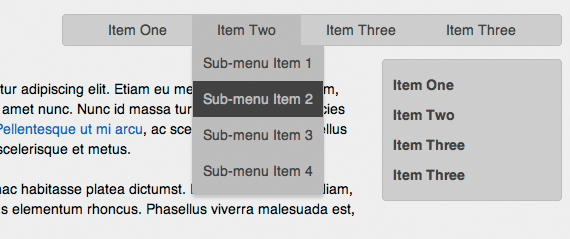
Now that we have a functioning menu, we can start styling it. I have created an sample page with two different examples using nmcDropDown.
The first—in the top-right of the page—is based on the simplified example above, just with additional CSS to style the menu bar and drop-downs. I also added an additional parameter to the call in JavaScript to make the menus slide down instead of fading in: $('#nav').nmcDropDown({show: {height: 'show', opacity: 'show'}});.
The second example is a little more interesting, as it's actually not a menu at all. In the right-hand sidebar, I am using nmcDropDown to create an informational panel with four heading that, which clicked on, each reveal a bit of text. To do this, I replaced the second level of <ul>s in my HTML with paragraphs. I then used the following CSS to line arrange everything vertically:
#sidebarNav { padding: 10px 0; background: #ccc; border: 1px solid #bbb; -webkit-border-radius: 4px; -moz-border-radius: 4px; border-radius: 4px; }
#sidebarNav li { border-top: 0 solid #ccc; }
#sidebarNav li:hover, #sidebarNav li.open { background: #bbb; }
#sidebarNav li a { display: block; padding: 5px 10px; line-height: 20px; color: #444; font-weight: bold; text-decoration: none; }
#sidebarNav li p { display: none; padding: 5px 10px 10px; color: #444; border-top: 1px dashed #aaa; }
#sidebarNav li:hover p { display: block; }
Finally, in the JavaScript I told nmcDropDown to activate on click rather than hover and to look for my paragraph instead of the unordered-list it usually expects:
$('#sidebarNav').nmcDropDown({
  trigger: 'click',
  submenu_selector: 'p',
  show: {height: 'show'},
  hide: {height: 'hide'}
});
Please look at the sample page to try these out, and view source to examine the code in more detail. If you find another creative way to use nmcDropDown, please link to it in the comments.
Related Posts


Comments
Manuel Alejandro
Hi, I tried to make the example work but I couldn't, then I found out that if I used version 1.0.3 it worked, but if I used ver 1.0.5 it didn't and I found the line where it breaks (not with an error but it stops working)it is on the functions over and out
over = function(e) {
a(e || this)
the e parameter and e || this are stopping the right behavior. I wonder if this is a bug because the 1.0.3 version doesn't have the parameter and only uses (this)
I don't know much javascript but I think it should work because if e is empty then uses this if not then uses e right ? but I don't know what is happening, could you please help explain this and how to fix it or avoid it , in the mean time I'm gonna use the 1.0.3 version thanks on advance.
Barry
I have the same issue as Paul; currently usingjQuery-1.9.1 and it seems like it only fires once, then defaults to the css effects only. any ideas on how to fix?
Paul
This no longer seems to work with jQuery-1.8.3The transition effects happen on first mouse over but subsequent mouse over only show and hide dropdown without the effects.
ANyone have an idea of a fix?
Ali
Very nice menu. Thanks for sharing.private guide
Seems to be easy. I'll try it on my siteJanis
Oh. and btw guys that can't find the download link.. it's on this page: http://www.gethifi.com/blog/nmcdropdownJanis
Thank's budd! This plugin together with the hover intent has a very nice and clean feel! And your css is very nice too!I just love these simple things!
kiran
plz share the demo link you only mention the websitebut there is so many other things are included
can you plz share the demo link
Julian
Man, why don´t you share a download link. I hate tuturials without download-link...Danilo
Great work!One question: how do I remove the list's bullet?
Thanks.
PraP
Beautiful!!lorddonk
This is really cool! Thanks! I was looking for a simple easy to use drop down script and I was able to integrate this one into Joomla! CMS easily. Unlike suckerfish you don't have to figure out how to unstyle before you can style it! :)Jason Chandler
I love this plugin! The only request I have is if you're using it as an accordion then only one item should be expanded at a time; clicking another header should collapse any others than are open. Then you could use this script in three ways: horizontal/vertical drop down menu, information panel and of course, an accordion. Thanks,Adam Cadieux
Great scrip. Works really well in Firefox, but I am having some problems in IE8. The drop shadow and the bottom boarder on the drop downs aren't working. Maybe there is an IE CSS file that I am missing...John Bradbury
Very sorry, please ignore my last entry. It was my screw up.
Thanks for a great menu.
John
John Bradbury
Works great until I try to use it with jquery tabs (/jquery-ui-1.7.2.custom.min.js). Is this a known problem or my screw up?
Thanks
N-Designs
awesome.. testing it now..
Charles
Great plugin but its behavior strangely isnt affected by the parameters I pass to it:
the delays are nowhere near the times specified.
http://www.neworleansworkshops.com/about/calendar.html
<pre>
<script type="text/javascript">
$(document).ready(function(){
$("#menu").load('/menu_items.html #nav');
$("li.separator").append('<img src="'+ separator + '" alt="" />');
$('#nav').nmcDropDown({
show_delay: 1500,
hide_delay: 1500,
show_speed: 1300,
hide_speed: 1300,
});
});</script>
</pre>
Eli Van Zoeren
George: Thanks!
Gary: I am not entirely sure what the problem is. If you have the table cell set to overflow: hidden, you wont be able to see the drop-down. That is the most likely thing that comes to mind, but of course there are lots of possible problems. I would check your css against the example above.
Gary
Hi, your script works awesome within divs but is there a particular trick to get it to work within a table? To be clear, the UL is withing a table cell.
George
Hello,
Very nice piece of work, I will definitely try it in my next project.
Lenny Terenzi
Awesome! Thanks Eli!
Leave a comment