Join our HiFi mailing list to receive the latest news & updates

Building an interactive map with jQuery instead of Flash

100 Comment(s) | Posted | by Joel Sutherland | |

There is an update to this post! Plese visit the new post that has a downloadable, generic plugin.

At the end of last year, we launched a website for Coastal & Marine Sciences in North Carolina with one of our Agency Partners, Liaison Design Group.  As a part of the project, the website was supposed to have an interactive map that showed some information and the location of the various Marine Science outposts across the state. The locations would be represented by dots and upon clicking one an info box would pop up and display information about the location.
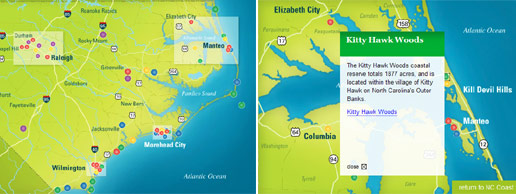
JQuery Map Overview

To make the map as engaging as possible, there needed to be smooth animations and crisp graphics.  Traditionally such a project would require the use of Flash. We try to avoid Flash whenever possible, so I began to consider how the project could be accomplished in jQuery.

There were a number of advantages of using jQuery over Flash for the project:

  1. Updates were Easy: Since the map was going to be a visual representation of html, it would be easy to update the data with our Content Management Software. Each location would be a 'page' in the system with contents and attributes like pixel coordinates that would be simple to update.
  2. Content was Search Engine Friendly: Since all of the data was represented in html, it would be easy for search engines to index and spider the content.
  3. Architecture would be naturally layered: All of the data would be stored in a database by the CMS. I would then build html templates for the information that the CMS would display.  jQuery and CSS would then take the html content and display it appropriately.  Each layer would have a natural role so it would be easy to make changes to any individual component of the application without having to worry about the whole thing.

My biggest concern using jQuery was performance.  An important requirement of the project was that the map should zoom when switching between coastal areas.  In Flash this would not be a problem, since transformations like these would be executed at a very low level on computer hardware.  This is not the case with jQuery, instead the DOM would need to be manipulated and then displayed.  I knew that this could be a struggle for less efficient browers like IE6.  Fortunately this turned out not to be a problem in the end.

The Five Locations

The Five Maps

In total, there were five maps that needed to be displayed and roughly 70 location dots.  The artwork for these maps was beautifully done by Liaison. The first map would show the entire NC coast and some of the location dots that were not highly concentrated.  It would also show 4 highlighted areas that could be clicked to zoom in to the other 4 maps where there were more highly concentrated location dots.

In order to simplify the code I had to write, I came up with the following rough procedure to run when one of the five maps was shown:

  1. Load the background image
  2. Load the bullets and info boxes
  3. Place the bullets and hide the info boxes
  4. Attach events to the bullets to display the boxes
  5. Add either the "Return to NC Coast" link or the Zoom-able regions

With this decided, I just need to come up with the markup for each bullet and a couple of jQuery functions to make it all work.

The Bullets and Info Boxes

The bullets and info-boxes for each map would follow a convention that allowed some simple jQuery to link the two together:


As you can see, both the bullet link and the info-box have similar ids that can be used to reference each other.  The class of the bullet contains its color and its rel attribute contains its pixel coordinates.  The jQuery to display this on the map and add the info-box event is dead simple:

$(this).children('a.bullet').each(function(){
  var coords = $(this).attr('rel').split('-');
  $(this).css({left: coords[0] + 'px', top: coords[1] + 'px'})
    .hide()
    .fadeIn()
    .click(function(){showPopup($(this).attr('id'));});
});

The showPopup method is simple as well:

function showPopup(id){
  $('#map div.popup').fadeOut(); 
  var boxid = '#' + id + '-box';
  $(boxid).fadeIn();
  $('a.close').click(function(){
    $(this).parent().fadeOut();
  });
}

The code simply relies on the convention between the bullet link id and the info-box id to select and display the box.  At the same time it is sure to close any other infobox popup that may be open.

Handling the Zoomable Regions

When the NC Coast map is displayed, in addition to the location bullets, there are also four zoomable regions. Like the bullets and infoboxes I settled on a naming convention that made the code much simpler.  The id of all of the related elements as well as map images would be derivable from rules.

Since it was important not to load all of the images at once for concern about loading time, I placed and sized a simple blank gif over each of the regions:

$('').css({
  border: 'none',
  position: 'absolute',
  width: width + 'px',
  height: height + 'px',
  top: top + 'px',
  left: left + 'px',
  cursor: 'pointer'
});

I also attached a click even to this image so that the zooming would occur when the time came:

.appendTo('#map').click(function() {
  $(this).siblings().fadeOut();
  $(this).hide()
    .attr('src', id + '_base.jpg')
    .fadeIn('slow')
    .animate({
      width: '577px',
      height: '418px',
      top: '0px',
      left: '0px'
    }, 1000, '', function(){
      $('#map').css({backgroundImage: 'url(id + '_base.jpg)'}).empty();
      loadBullets(id, true);
    });
});

You'll notice that when clicked, the blank image is swapped for the real one and it is resized to match the map and placed in the top left corner. jQuery's animate function handles these linear transforms with no problem and the map is smoothly scaled into place. It results in a simple yet nifty effect.

Conclusion

In this case, jQuery was a great alternative to Flash. Because of the beautiful artwork, the interactive map looks great with the jQuery animations. The potential performance problem was not an issue and the client is able to have control of the maps content without having to bother a web developer.

It is great to have the opportunity to work on such a fun project in partnership with a talented designer and a client that is as excited about technology as we are. Be sure to head over to the site to check out the final map and learn more about Marine Science in North Carolina.

100 Comment(s) | Posted | by Joel Sutherland | |

Comments

  1.  Seamus's avatar
    Seamus
    | Permalink

    Thank you kind sir for the nice writeup. It's interesting to read a case study" of our collaborative effort from the developer's point of view.

    Here's to future team efforts...
    Seamus"

  2.  cssProdigy's avatar
    cssProdigy
    | Permalink

    This is just awesome. I can't believe it's not flash! Great work. And coastal Carolina is awesome.

  3.  Joel Sutherland's avatar
    Joel Sutherland
    | Permalink

    @Seamus
    Thanks for the comments -- I too look forward to the next project.

    @cssProdigy
    Thanks as well. It was a lot of fun to work on such a cool topic.

  4.  Kevin Mario's avatar
    Kevin Mario
    | Permalink

    Opened up the site with Firefox 2 and some of the pop-ups had scrollbars under them.. might get rid of this problem by changing overflow: auto to visible on your style.css ( line 609 I believe )

    Hope this helps.. otherwise nice app you've got there =)

  5.  Joel Sutherland's avatar
    Joel Sutherland
    | Permalink

    @Kevin Mario
    Thanks so much for the specific feedback! This should now be fixed!

  6.  Kevin Mario's avatar
    Kevin Mario
    | Permalink

    Glad I could help =)

  7. Azeem's avatar
    Azeem
    | Permalink

    Great work! - an alternate to flash is always good.

    Although I noticed one minor error, more in the content that the code. The popup containing the entry for Carteret County Shore Protection Office" heading breaks out of the yellow background header and spills out.

    I guess this is because the bg image is a set height and it was only intended to hold 2 lines of text but "Carteret County Shore Protection Office" uses 3 lines - A small error but I thought you might want to know. "

  8.  Andrew's avatar
    Andrew
    | Permalink

    I'm wondering - why didn't you use Google Maps and perhaps create custom tiles? It doesn't seem like I can pan on the map?

    I recently founded a start-up focused on mapping, and we use Google Maps API, along with YUI for ajax.

    Basically, while Google is fetching and rendering the map tiles, we fetch up overlays" in parallel, using YUI async requests. The overlays are the trails and waypoints on the map, along with their metadata. To make the maps snappy, we also cache various map views in static files as JSON.

    I don't know that you want to reinvent the wheel, especially when you don't have the resources to make it feature complete (panning and zooming the map)."

  9.  James Cready's avatar
    James Cready
    | Permalink

    I built a map kinda sorta similar once: http://www.enfatico.com/contact.php"

  10.  Joel Sutherland's avatar
    Joel Sutherland
    | Permalink

    @Azeem
    Good catch. We decided with the client to enforce a 1-line rule on the headlines. It looks like that slipped past us.

    @Andrew
    I've used the Google Maps API before (it was actually marine science related! I worked with a professor to track Sea Turtle migration in the Atlantic) but it wasn't a good fit for the project.
    We have a very limited dataset and the panning of Google Maps would have been more distracting than anything else. By doing things this way, users wouldn't find themselves somewhere without interesting data.

    @James
    Cool! I love the way the bullets fan out at the beginning.

  11.  Cyanbane's avatar
    Cyanbane
    | Permalink

    Great Post. The transitions from main map to sub maps are very smooth.

  12.  Chris Olberding's avatar
    Chris Olberding
    | Permalink

    Nice. I did some similar a few years back only using html and css for apartment locations within a city. Needless to say it did not come out nearly as nice as yours. But yeah, updating with this type of map is easy and a lot more simple to program against.

  13.  Gary's avatar
    Gary
    | Permalink

    Couple of ideas to make it even more accessible:
    1) Add a href attribute value to each of the anchors, then within the click function of for the anchors, add a e.preventDefault() - this stops the link being followed and another page loading. This means users with some combination of JS/CSS enabled/disabled can still get to a page, all about the specific location.

    2) Load the popup content with AJAX from the actual page itself, then you won't have to sets of content to maintain.

  14.  Jim Hanifen's avatar
    Jim Hanifen
    | Permalink

    This is great, I love seeing anything usually done in flash done using javascript. Nice work and thanks for the post.

  15.  Eric's avatar
    Eric
    | Permalink

    Beautiful map and use of jQuery. Are you able to add bullets to the map via the CMS? If so, how does that work?

  16.  Joel Sutherland's avatar
    Joel Sutherland
    | Permalink

    @Eric

    The client adds locations to the map by creating new pages within a section. Each page corresponds to an infobox and a bullet.

    To place the bullet, one of the CMS fields is used:
    312-50-blue

    Where the first two are pixel coordinates and the last is obviously the color of the bullet. The client picked this up quickly and has added a lot of information since we launched.

  17. gamma911's avatar
    gamma911
    | Permalink

    Well done on the map integration, I would love to do this for one of my projects - my map would have three zoom levels, do you think this would be possible?

  18. Joel Sutherland's avatar
    Joel Sutherland
    | Permalink

    @gamma911

    Three levels of zoom certainly would be possible. If you poke through the live javascript you'll see I have separate functions for placing the bullets and zoomable regions. You would just need to place more zoomable regions on each of the second level images.

    Let me know if you have any questions and thanks for the comment!

  19.  gamma911's avatar
    gamma911
    | Permalink

    Thanks for the tip - look at this site: http://www.visitscotland.com/guide/

    I am trying to achieve a similar effect on the map but would like the client to add points to the map without me having to go to flash to do it.

    So we will need 3 levels of zoom.

    How achievable do you think this is, or should I just stick to flash?
    "

  20.  Joel Sutherland's avatar
    Joel Sutherland
    | Permalink

    @gamma911

    I'm sure you could use flash or JS, I found it much quicker to do in jQuery.

    To place the bullets, I had the client enter pixel coordinates into our CMS. Even for someone non-technical this is easy to figure out quickly.

  21.  Eric Wendelin's avatar
    Eric Wendelin
    | Permalink

    Good work, but I second Andrew's suggestion of the GMaps API. You could likely have overridden any functions that didn't perfectly suit your needs. Very impressive work as I said, though.

  22.  Graham Scragg's avatar
    Graham Scragg
    | Permalink

    Thanks so much for blog entry!!
    I needed something similar for a client, and was trying to do it with the OpenLayers API, using jquery is so much more intuitive.
    I modified your code to allow for dynamic zoomable areas as well as different types of button.
    Good work.

  23.  Mike Duguid's avatar
    Mike Duguid
    | Permalink

    As a flash developer I have to point out that none of the 3 advantages you list over flash are actually any different to what well developed flash could provide.

    # Updates were Easy
    A swf map could have it's data fed from flashvars embedded in the html or from a database (or from xml etc), and all image assets would be loaded externally.

    # Content was Search Engine Friendly
    Google spiders swf content now, but again the important data could be held in the html via flashvars or in alt content (see swfobject alt content)

    # Architecture would be naturally layered
    All of the data could be read from a database from flash too.
    In flash development nowadays most developers have separate text (.as) actionscript files that handle each function so the separation of functionality is the same.

    The only real advantage in using jquery is that it doesn't require a plugin.

  24.  Micah Slavens's avatar
    Micah Slavens
    | Permalink

    We use jquery quite a bit these days in our shop. It is a great alternative to Flash in many cases. However, I do think that it's got a long way to go. The above example, to me, looks much more choppy than a well built flash piece would. It's quite choppy and it doesn't load very quickly.

    This is still great work and a good concept, but it may be stretching what Jquery was intended to do.

  25.  Joel Sutherland's avatar
    Joel Sutherland
    | Permalink

    Micah,

    Thanks for the comments -- I agree that there are some performance issues with javascript. The next generation of browsers will help that out quite a bit by speeding up DOM manipulations.

    You've got a great site!!

  26.  Steve's avatar
    Steve
    | Permalink

    Wow.. Love it... working with jquery everyday lately - this is one of the best and simple examples of a zoomable map I have ever seen. Great Job! Could you send me a zip also? I want to also play around with dragging a large map around in the window. Will keep you up on my success.

    We are working on a community base snowmobile map for the region - I just love your setup!

    Cheers!

  27.  Joel Sutherland's avatar
    Joel Sutherland
    | Permalink

    Steve,

    I just sent you an email with some info! Thanks for the comments.

  28.  Wes Crockett's avatar
    Wes Crockett
    | Permalink

    Hello,

    This is an AWESOME use of jQuery... With your permission, and help by sending a demo zip, I would love to implement this in our schools website to highlight the brand new library that we just opened.

    Thank you and way to go!
    Wes

  29.  Joel Sutherland's avatar
    Joel Sutherland
    | Permalink

    Wes,

    An email has been sent your way with initial instructions. Be sure to post back here when you've got it running!

  30.  Padraig Boru's avatar
    Padraig Boru
    | Permalink

    Joel,

    You are going to get tired of doing this, but I must ask.

    Would you mind also sending me your demo.zip and the instructions?

    Thanks in anticipation.

  31. Mr Brown's avatar
    Mr Brown
    | Permalink

    Yet another person after the zip!

    Need a contact map (dont need the zoom)and this looks relly nice. As I dont know squat about flash this is a nice solution.

    Thanks heaps

  32.  Shawn Dampier's avatar
    Shawn Dampier
    | Permalink

    Wow, fantastic work and thanks for the tutorial - as long as people are asking for the .zip, I would love it as well. Our agency built an interactive map for Germany a few years back that was done in Flash and we encountered all of the same issues you mention. Would have loved to have had this solution then - but going forward, I would built custom maps ala the method you have shown here.
    Thanks again for the tutorial.

  33. Dmitri's avatar
    Dmitri
    | Permalink

    Hey! Nice!
    But there is one problem.
    The div with id 'containershadow' (with the map) is below than normal. I see big white space with shadows detached on the right and than the map-container itself.
    I'm using FF 3.0.7 on Mac.

  34.  Jason's avatar
    Jason
    | Permalink

    This is pretty cool, good job. Although I would have saved myself the headache of browser testing etc. and just do it in Flash :)

  35.  Brian Lang's avatar
    Brian Lang
    | Permalink

    Has the plugin been released? Where can I get it?
    I've got an outstanding request for one website to build an interactive map, but it's been put on the back burner for a few months. Perhaps this may be what they're looking for. Can you send me a copy of the demo?

    Thanks.

  36.  Joel Sutherland's avatar
    Joel Sutherland
    | Permalink

    Brian,

    The plugin has not yet been released. I am hoping to wrap it up this week. I'll post it on the blog along with some instructions when I am finished with the writeup and testing.

  37.  Geoff's avatar
    Geoff
    | Permalink

    Hey there, really really nice alternative to a flashed based solution, would love a copy of the demo files please also. cheers!

  38.  Jamie's avatar
    Jamie
    | Permalink

    Nice job.

    i wonder,where i can get that plugin and example ??
    can someone tell me?
    i really appreciate.

    Thanks.

  39.  Bonnie's avatar
    Bonnie
    | Permalink

    Joel,

    Great stuff! Are you releasing the plugin this week? I showed a client the example b4 reading you hadn't released it yet - so now I'm sitting on pins and needles ;-)

  40.  jamie's avatar
    jamie
    | Permalink

    i'll be waiting until your plugin released.

    Thanks Joel..

  41.  Renee's avatar
    Renee
    | Permalink

    @Mike D: I stay away from Flash now because it still has a bad reputation in the accessibility world and, yes, it can be made accessible, but it's still a large pain in the ass to do so, and still only degrades semi-gracefully. And when a tool with jQuery is already packaged into major CMSes, why not use it? jQuery code is far more transparent to future developers, it doesn't require buying any more Adobe products, and it's WAY easier to restyle. It's also a lot faster if you make good use of its AJAX capabilities than loading a Flash file, even if in-browser performance isn't (but honestly, I can't tell the difference without looking at benchmarks, and neither can users, ftmp). And it's not confined to one zone on the page, so it's far more flexible... So there are some more reasons to head away from Flash as a development tool.

    I've been using, and hating, Flash for years and jQuery was like a summer breeze blowing open the curtains. :)

    Ditto on the breathless anticipation of the plugin, I already have a map in mind =)

  42.  Cato's avatar
    Cato
    | Permalink

    Wow, this is excellent, would love to see a demo zip if possible?

  43.  Davor's avatar
    Davor
    | Permalink

    Great work. Is this available as plugin perhaps, or a zip file, I could really use it about now. :D Sry for asking like this but everyone has allready.

  44.  kotnik's avatar
    kotnik
    | Permalink

    Really nicely done!

    Just started to do similar map, and I'd really appreciate if you could send me demo zip, as well.

    Thanks.

  45.  Tim Brown's avatar
    Tim Brown
    | Permalink

    Awesome! Jquery rules.
    Could a Demo zip be sent (or posted on this entry)?

  46. ChevignoN's avatar
    ChevignoN
    | Permalink

    If you want to extract the code, you can use Firebug, it is an extention of firefox.
    I'm testing the map, and it work very well.

  47. Mark's avatar
    Mark
    | Permalink

    Great script! but could you please send me the code? I can't really figure out why the bullets wont load when I put all the script together myself =S

  48.  Tonka's avatar
    Tonka
    | Permalink

    Hi,

    great script. Is there any chance to have the zip file?

  49.  Ryan Mawhinney's avatar
    Ryan Mawhinney
    | Permalink

    @joel

    Hi I am trying to design a Jquery Interactive Map using the same technique you used for the NC Marine Science as I am planning on integrating it for my University Major Project. I am having a bit of trouble getting the map loaded at the start. Would it be possible to be sent a Demo.zip of the file to help me get started. Thanks Ryan

  50. chris's avatar
    chris
    | Permalink

    Hi Joel, awesome work with the interactive map and it's inspired me with my mapping project. Any possibility to email me the zip file too? Thanks!

  51.  Nathan Fried's avatar
    Nathan Fried
    | Permalink

    Hey Joel,

    I am new at a lot of stuff here.

    Call me stupid but Im confused as to where you put the info that pops up on the info box when you click a dot on the map.

    I used firebug to look at it more closely but just couldn't figure what file I should stick that in???

    Looking at the jquery, css, and html... I can understand where and how this works but...

    where does that info for the pop up box go???

    ~Nate

  52.  Nathan Fried's avatar
    Nathan Fried
    | Permalink

    From the looks of it, I think you stick all the pop up" descriptions in "inner HTML".

    But when looking through your source code, I can't find the description of say..."East Carolina University"

    Running firebug, I do find it but Im so confused as to where to put that info!

    God I hate being such a Novice at Web Development.

    Maybe it would be good for me to just look at the .zip files??? Email them to me pleeeeaaaase???

    Thanks again,
    ~Nate"

  53.  Rad's avatar
    Rad
    | Permalink

    Great work. Could you please send me demo zip.

    Thanks,
    Rad

  54. Sheereen's avatar
    Sheereen
    | Permalink

    Awesome work, is it possible that you send me a zipped demo or something?

  55.  Bage's avatar
    Bage
    | Permalink

    Wow... It is actually great... I am planning to develop a map for my town. Is it possible to get a demo in a zip file?

    Thanks
    Bage.

  56.  marco's avatar
    marco
    | Permalink

    Hello Joel.

    Impressive indeed.

    If you have time, would you be able to send me a demo.zip?

    Thanks.

  57.  Justin's avatar
    Justin
    | Permalink

    Hey Joel,

    Amazing jQuery mapping project!, for a school project i try to make a interactive map for a dutch festival (Lowlands) (for mobile phones).
    Also got the same question :).. Would you be able to send me a demo copy? Would be great if i have an example of how this could work!

    Thanks!

    Justin.

  58. cialis's avatar
    cialis
    | Permalink

    Perfect work!

  59.  Jeremy's avatar
    Jeremy
    | Permalink

    Great work! I am looking to do something similar, and if I can get a head start rather than starting from scratch that would be great.

    I see a post about a reusable component to be released 'in a few days'. Has this been released yet? Or can a person get a peek at the source for the existing demo?

    Keep up the good work!

  60. cialis's avatar
    cialis
    | Permalink

    Perfect work!

  61.  Lauren Egan's avatar
    Lauren Egan
    | Permalink

    I am in love with this map! I am working on a project where this would be more than perfect. With your permission, can you send me a demo.zip? I can e-mail more details on the project separately.

    Thanks!

    Lauren ^__^

  62.  RIchard Dyce's avatar
    RIchard Dyce
    | Permalink

    It's a work of genius man! IT's so nice to see a GIS interface that is a googlemash. Can I add my name to the list of people requesting a zip file?

  63. ZK@Web Marketing Blog's avatar
    ZK@Web Marketing Blog
    | Permalink

    An alternative to Lightbox and its various clones, with the sole purpose of displaying images: One or more thumbnails point at the full resolution image, and instead of displaying that image on a new page, its displayed, above an overlay, on the current page.

  64.  Pratik's avatar
    Pratik
    | Permalink

    Hi,

    Its really great work. Its so lite n smooth. Thanks Joel.

    Somebody Help me out for problem....
    The given example runs fine on my PC... but when I uploaded it to server (Linux), the bullets did not appear. uploaded examples link is http://www.ushawoods.com/test/u2/example.html

    Thanks

  65.  FocusWithJava's avatar
    FocusWithJava
    | Permalink

    I love this community's willingness to share.

    I would love to implement this for one of my local outdoors organization, for a location guide that will list Hiking, Backpacking and Kayak trips. My data set will have similar clustering around various state parks and waterways. But I may need a 3rd level of zoomable regions (ex Adirondack). Oooh.. I am getting all excited.

    Please add me to the list for the ZIP file. Gota itch that I got to scratch.

  66.  FocusWithJava's avatar
    FocusWithJava
    | Permalink

    Thanks for making that ZIP file accessible at

    http://www.newmediacampaigns.com/blog/category/jQuery#zip

    PS: great work

  67. Monica's avatar
    Monica
    | Permalink

    I am having the same problem as Pratik (July 4 comment). What is the trick? Thank you so much for any suggestions you can provide. Monica

  68. Joel Sutherland's avatar
    Joel Sutherland
    | Permalink

    The plugin post for this project has information about the issue Pratik had:

    http://www.newmediacampaigns.com/page/a-jquery-plugin-for-zoomable-interactive-maps

    "The AJAX/load uses GET or POST to retrieve the popup files. So the file extension used has to be what's allowed (.aspx, .php) on your server to accept these requests."

  69. kilinkis's avatar
    kilinkis
    | Permalink

    lovely!

  70. Eerk's avatar
    Eerk
    | Permalink

    Great looking project! Congrats!

    I would like to mention the fact that a flash file can work with a CMS or even google maps in exactly the same way that javascript can!

  71. Eric Di Bari's avatar
    Eric Di Bari
    | Permalink

    Great tutorial. I'm always looking for ways to avoid using flash. Also, I've become a big fan of jquery. Thanks.

  72. Ian Huet's avatar
    Ian Huet
    | Permalink

    I recently completed a somewhat simpler implementation of an interactive map using JQuery and a HTML Image Map rather than Flash. I am very happy with the result.

    http://www.workwithchoicecuts.com/methodology/revisiting-the-html-image-map/

    The discussion above JQuery performance versus Flash smoothness is an interesting one. For me though, JQuery beats Flash hands down every time for the simple fact that it is part of the page rather than a proprietary black box sitting on top of the page.

    Props to you guys for a project beautifully completed.

  73. david stranack's avatar
    david stranack
    | Permalink

    hey,

    this map is AWESOME, I have tried to make a start using your logic but as a newbie I'm not getting very far, could I please have a demo.zip as well??

    THIS TUT ROCKS!!!

  74. Phoon's avatar
    Phoon
    | Permalink

    Hi Joel,

    Impressive project with the nice detailed map.
    Would it be ok to send me a demo zip too?

    Greatly appreciated.

    Thanks

  75. Bret Bouchard's avatar
    Bret Bouchard
    | Permalink

    This is gonna be a fun lil toy to play with. It will be nice to use for mobile site, especially iPhone where i always hate having people jump out of the page to explore a map in the Google maps doc.

  76. wespai's avatar
    wespai
    | Permalink

    nice collect it to http://ajax.wespai.com

  77. Alan Crissey's avatar
    Alan Crissey
    | Permalink

    Hey, this plugin is great. Just yesterday I was given to task of porting some Flash maps over to HTML and this is a near perfect solution. Thanks for your work.

    One question - is there a way to reference the 'bullet' links outside of the map? I have a list of locations to the side of the map and on the old flash version, you could both click on the map and the name in the menu to trigger the popups. I'm not that great at javascript and I'm not quite sure how to accomplish this. Any ideas?

  78. Sean's avatar
    Sean
    | Permalink

    While the map looks good and functions well, I think it is a stretch to call it "interactive." You really cannot do anything on the map except click links. If that is the threshold of obtaining an "interactive" label, then doing all of this with an image map would qualify.

    For me, interactive requires me to be able to do something other than just click. Something as simple as pan and zoom in particular will get you there.

    And while I don't think that you would need to put something like this in a Flash map, I have to agree with someone above me who pointed out that all of your arguments against using Flash just don't hold water anymore, and didn't for a while even at the time of this post. While I certainly am not a Flash advocate, I absolutely hate when people spread misinformation about a technology that has some true benefits.

    Still, as I said, it is a good looking map.

  79. Joel Sutherland's avatar
    Joel Sutherland
    | Permalink

    Sean,

    If you click one of the highlighted areas the map zooms. This is why I used the word "interactive".

  80. Dejan Web Dizajn Artist's avatar
    Dejan Web Dizajn Artist
    | Permalink

    This is awesome! Wow! :)

  81. Alan's avatar
    Alan
    | Permalink

    Hey Joel, your map has worked great for me. Do you know of any way to make outside links interact with the map? Such as a list of locations that, when clicked, do the same thing as clicking on the points on the map?

    Thanks!

  82. Joel Sutherland's avatar
    Joel Sutherland
    | Permalink

    Alan,

    You could do something like this:

    $('#someOutsideLink').click(function(){ $('#bullet-point').trigger('click'); });

  83. Alan's avatar
    Alan
    | Permalink

    Thanks Joel, worked perfectly!

  84. Cassie's avatar
    Cassie
    | Permalink

    Joel,

    This looks great!
    Could you send me a demo zip as well?

    Thanks much!

  85. Fancy's avatar
    Fancy
    | Permalink

    Very great work! wonderful!

  86. Priyanka's avatar
    Priyanka
    | Permalink

    Amazing work!! Could you share the code zip?

    Thank you.

  87. Miami Web Design's avatar
    Miami Web Design
    | Permalink
    Very nice. I was actually looking for something like this. I will post an update with a link to our image map once we are complete. Thank you
  88. Erik's avatar
    Erik
    | Permalink
    hello all :) I'm erik from Indonesia, I've a problem on IE(8) I'm working on an infographics system like this post, and I've download the zip project, and I make a different kind placement for the "zoomap.js" I put this script on a PHP file because I've to POST the ID and from a form and SELECT it in ORACLE DATABASE, here.. <?php.... <script type="text/javascript"> $.noConflict(); /* jQuery(document).ready(function($)*/ jQuery(document).ready(function($){ /* Show jQuery is running */ $('h1').css({textDecoration: 'underline'}); $('#map').zoommap({ // Width and Height of the Map width: '902px', height: '468px', //Initial Region to be shown map: { id: 'campus', image: 'images/indonesia2.jpg', data: 'popups/kota.php?act=item&iditem=<?php echo $_GET['iditem']; ?>', maps: [ { } ] } }); }); ... ?> it running well on Firefox, but not in IE, here comes the error detail ----------------------------------------------------------- Webpage error details User Agent: Mozilla/4.0 (compatible; MSIE 8.0; Windows NT 5.1; Trident/4.0; InfoPath.2) Timestamp: Wed, 14 Jul 2010 02:36:31 UTC Message: Expected identifier, string or number Line: 21 Char: 3 Code: 0 URI: http://10.2.21.200/ShowCase2/js/zoommap.js Message: Object doesn't support this property or method Line: 147 Char: 1 Code: 0 URI: http://10.2.21.200/ShowCase2/mapf3.php?act=item&iditem=3030566 --------------------------------------------------------------- line : 147 is the $('#map').zoommap({ . .. . . }) I'm wondering if U can help me fix the problem.. and I'm so sorry can't give U the system link, because it's an internal system,, thnx so much for this great post... :D
  89. Erik's avatar
    Erik
    | Permalink
    hello all :) I'm erik I've a problem on IE(8) I'm working on an infographics system like this post, and I've download the zip project, and I make a different kind placement for the "zoomap.js" I put this script on a PHP file because I've to POST the ID and from a form and SELECT it in ORACLE DATABASE, here.. <?php.... <script type="text/javascript"> $.noConflict(); /* jQuery(document).ready(function($)*/ jQuery(document).ready(function($){ /* Show jQuery is running */ $('h1').css({textDecoration: 'underline'}); $('#map').zoommap({ // Width and Height of the Map width: '902px', height: '468px', //Initial Region to be shown map: { id: 'campus', image: 'images/indonesia2.jpg', data: 'popups/kota.php?act=item&iditem=<?php echo $_GET['iditem']; ?>', maps: [ { } ] } }); }); ... ?> it running well on Firefox, but not in IE, here comes the error detail ----------------------------------------------------------- Webpage error details User Agent: Mozilla/4.0 (compatible; MSIE 8.0; Windows NT 5.1; Trident/4.0; InfoPath.2) Timestamp: Wed, 14 Jul 2010 02:36:31 UTC Message: Expected identifier, string or number Line: 21 Char: 3 Code: 0 URI: http://10.2.21.200/ShowCase2/js/zoommap.js Message: Object doesn't support this property or method Line: 147 Char: 1 Code: 0 URI: http://10.2.21.200/ShowCase2/mapf3.php?act=item&iditem=3030566 --------------------------------------------------------------- line : 147 is the $('#map').zoommap({ . .. . . }) I'm wondering if U can help me fix the problem.. and I'm so sorry can't give U the system link, because it's an internal system,, thnx so much for this great post... :D
  90. Jan Hanak's avatar
    Jan Hanak
    | Permalink
    This is a great map, thanks! I'm trying to implement this on a map and use each state as a bullet. I works fine in FF, but when a state is clicked all of the states after it (alphabetically) disappear. Also, nothing is showing up in IE. Am I trying to do something impossible or have I lost my mind? :) Here's the example: http://clients.fusion413.com/als-beef/
  91. stephan's avatar
    stephan
    | Permalink
    Hi Joel
    Really Fantastic Work. Just what i need.

    I would like to be able to build a 3rd and 4th level...

    Here is what i did using the Raleigh interactive map...

    map: {
    id: '0',
    title: 'Triangle',
    image: 'images/image.jpg',

    maps: [
    {
    id: '1',
    parent: '0',
    image: '../images/1.jpg',
    data: '../popups/1.html',
    width: '350px',
    height: '235px',
    top: '0px',
    left: '0px',

    maps : [
    {
    id: '3',
    parent: '1',
    image: '../images/3.jpg',
    data: '../popups/3.html',
    width: '100px',
    height: '100px',
    top: '100px',
    left: '100px'

    }
    ]
    },

    .....

    The 3rd image appears quickly before disappearing and i can't click on it to zoom!

    Maybe a z-index error?
    What do you think about that?
  92. mandy's avatar
    mandy
    | Permalink
    The zip is not working on my PC. no bullets are showing at all. Any idea? I have try different downloads, none of them are working.

    Please advise.
  93. Guga's avatar
    Guga
    | Permalink
    Hello Joe,

    Excellent job. Elegant work.
    I´ve been tring to apply it in a site about museums. Everything is fine, except for Google Chrome: the yellow boxes (highlights) doesn´t appears.
    Any suggestion?
    Thank you.
  94. Matt's avatar
    Matt
    | Permalink
    I really like this idea. I just have one question. Where did you get your images from? I really like them and would love to find of the entire US.
  95. Mike's avatar
    Mike
    | Permalink
    Great alternative to flash! I am going to use this for one of my clients very soon. Nice work and thanks for the post.
  96. joy's avatar
    joy
    | Permalink
    Great job! Is it possible to receive a demo.zip?
  97. Mark Pinkston's avatar
    Mark Pinkston
    | Permalink
    I am the lead interactive developer for AARP's daily news website The Bulletin. AARP has decided to no longer support Flash on its sites. This leave me as the developer in a bit of a quandary. JS has always been time restrictive from a development point of view for our daily news website. This looks like a viable alternative. I too would love a zip file so we can determine if this is a good alternative to the following examples;

    http://www.aarp.org/work/job-hunting/info-07-2010/pain_index.html

    http://www.aarp.org/health/medicare-insurance/info-12-2010/medicare_beneficiaries_percentage_2010.html

    Thank you
  98. StronyKraków's avatar
    StronyKraków
    | Permalink
    This map looks amazing - i'm going to develop it in my new client project - i'll be back to show you results of work ;)

    Thanks!
  99. Nishant Prajapati's avatar
    Nishant Prajapati
    | Permalink
    why flash not used in recent era ? And how we can use jquery instead of flash ?
  100. Sue's avatar
    Sue
    | Permalink
    Hi there...
    just trying to make your interactive map work but no luck...the map does not show up when tested on a live server...?

    http://www.digitalmake-up.com/staging/testing.html
    how do I get your concept to work?
  101. Sue's avatar
    Sue
    | Permalink
    OMG!!!...It's wonderful!!!- disregard earlier comment, it works like a charm...all I had to do is change the popups files to .php...(I had them as html).... and didn't read the earlier comments, so my bad.

    Great plugin....Bravo!!!
  102. sandeep kumar bhatt's avatar
    sandeep kumar bhatt
    | Permalink
    this is really a great post... thx Joel.
  103. Danja's avatar
    Danja
    | Permalink
    Hello,
    First of all, great map!
    I am hoping to get it to work for the new Georgia Tech student center facilities map as part of my lowly college student job...
    I have been trying to come up with a way to integrate the map highlight functionality (this jquery plugin: http://plugins.jquery.com/project/maphilight) with this map so that regions highlight on mouseover before they are clicked.

    Unfortunately, the map highlight code uses the idea of an "image map" to a letter (it uses an image instead of a div with an image as a background), thus making it difficult to integrate with your interactive map, which is contained in a div. Do you have any suggestions?

    I have the two scripts working separately just fine, just can't find a way to mesh them together!

    Thanks,
    Danja
  104. Mike Guenther's avatar
    Mike Guenther
    | Permalink
    I would also like to add more levels than 2 like stephan.

    How would the code look for this?

    thanks!

    MG
  105. kgvr's avatar
    kgvr
    | Permalink
    Great!
  106. siavash's avatar
    siavash
    | Permalink
    Hey Joel, your map has worked great for me. is it possible to load pop up data from div contents of index.html? it is for performance issues
  107. Jose's avatar
    Jose
    | Permalink
    interesting application, I want to do something similar, but not how to begin, and will help much at least see the application code,
  108. ahmed's avatar
    ahmed
    | Permalink
    nice but how to make a uae map like this ?
    thankss
  109. ixago's avatar
    ixago
    | Permalink
    Hello,
    Is that possible to add icons on this maps to represent informations like POI ?
    Thanks for your answer
  110. Jacksonville Town Center's avatar
    Jacksonville Town Center
    | Permalink
    $('#someOutsideLink').click(function(){ $('#bullet-point').trigger('click'); }); >>>>>>>> Did that work. So close.... AWESOME Info.
  111. Elias's avatar
    Elias
    | Permalink
    Hey: I have an antique timechart and want to view it in an interactive pan&zoom viewer, so i can convert it to an app. Can you do this type of work?
  112. Peter Schmalfeldt's avatar
    Peter Schmalfeldt
    | Permalink
    There is also http://jqvmap.com that uses resizable SVG with fallback VML for older browsers like IE 6. I like this one since you can customize the colors and sizes pretty easily. Super configurable.
  113. Mike's avatar
    Mike
    | Permalink
    Is there anyway to edit the delay of the "return to map" button after a new zoomed in map comes up?
  114. Ricardo's avatar
    Ricardo
    | Permalink
    Hello. The map does not work in Internet Explorer 8 and in Google Chrome it does not display the location points. Does anyone know how can it work for these two issues.

    Thanks

    Ricardo
  115. Sam's avatar
    Sam
    | Permalink
    This is great, we used this for one of our projects and it worked out very well. It's very easy to configure , just a few script updates and your on your way.

Leave a Comment